Now new OS Mac Tahoe. OS - macOS Tahoe - Apple
My 2017 iMac is too old … Don’t think I’ll upgrade just yet, wait a year and buy 2nd hand, perhaps.
2 Likes
I thought that I’m in the minority of users who shout go the f*up when a copilot or onedrive backup keeps nagging… but also they made even more evil move, now the Commad+V starts copilot (i.e. Windows+V, but you know what does it mean when you’re on mac constantly switching between mac/win)
What is this copilot of which you speak? When I press WinV it just brings up stuff that I’ve copied with CtrlC and lets me pick which one to paste.
I don’t understand people who complain about things they can control and choose simply not to use. Like OneDrive. I think I have used it in the past, but no way would I ever have it automaticallu backing up anything, nor active by default. If it bothers you why don;t you just switch it off?
Windows key + V opens the clipboard and emojis. No copilot. I guess it depends on the regional settings or some other setting in windows.
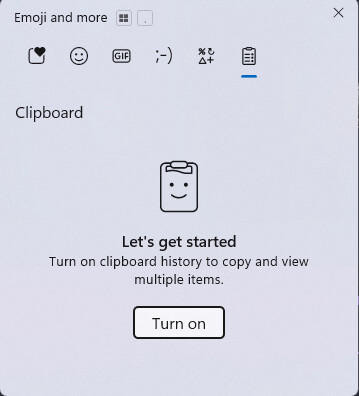
right, it’s the other way around, Win+C
In my private life I’m Linux user, but… so no I won’t bother configuring UI of windows machines I have to RDP which are rebuilt every run
The mac <> win, copy&paste was always causing a mental strain, but now it’s on another level
Takes me to settings. Oh yeah I see that it’s got some sort of association, except that it hasn’t.
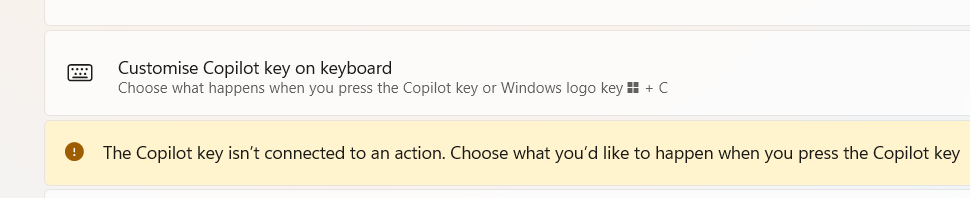
Anyway, I’m assuming that this is a problem only because that (or equivalent) key combination on the Mac is used for something else? Obviously I’ve never pressed it in the 2 years since I’ve been using W11.
Moral of the story: don’t use a Mac! 
1 Like
This is a nightmare!
I may have to adapt some software at my job because a customer has this ****** way to operate. Windows virtual machines that are created when the user connects and destroyed when the user closes the session. There might be a use case for this, but not for my customer. It’s not a national security sensitive application or anything remotely similar.
I assume that there’s a smart way to do this. I customize my powershell profile, I customize my python environment…hopefully there should be a way to customize a windows VM by saving relevant settings in a customized profile.
maybe you can automate the customization. just run a script each login.
1 Like
So I guess this doesn’t apply to Switzerland, am I right? Wonder if our government has something to say about this…
By eck, that takes me back a decade or four to when I had to set up some machines with dual boot to enable various software licenses to run.
Just a simple option in the config.sys file, or was it in the autoexec.bat? Bot, probably, to modify the system date and start DOS, to allow an earlier version of a particular software package to run, or to start Windows for other usage.
Happy days, things were so much simpler then. Would have been DOS3.11 and Windows 2.0, if memory serves me well.
mmmmmm, will it work if I declare my address in EU country and connect to a VPN in that country?
I already pay for a VPN…
Eat a Bic Mac instead.
1 Like
I have a 2012 Mac mini, battery is still good but I did give her a 500 GB SSD maindrive which made a whole different machine.
I run mainly Affinity suite and streaming and cant complain.
I have a second hand PC running my plotter, color laser and high volume scanner… (still havnt found a way to make money with that damm thing) and will be a happy camper if the PC lasts even half as long.
true, this speaks like the best workaround, I guess I’m waiting for the tipping point when I decide it’s been already enough to stop/delay what I was supposed to accomplish to make the script 
out of the box, I’ve been always laughing bout the competition, it certainly feels like the Apple is always looking for ways how to make your life nightmare if you’re Windows (and accidentally Linux) user. Or the other way around  Why they (all of them) don’t just settle to appeal more users from everywhere by giving a simple preference settings, much like the keyboard layout
but the dirty tricks to hook copilot into most common mac keyboard shortcuts is… just plain dirty
with chatgpt, you can get it to write the script for you.